Automating contact enrichment across Klaviyo, Shopify, and Google Sheets
The challenge: fragmented customer data
Most e-commerce businesses operate with data spread across multiple platforms—Shopify for transactions, Klaviyo for email marketing, and often a spreadsheet serving as the operational backbone. The problem: these systems don't natively share identifiers, making it difficult to build a complete customer profile.
Without a unified view, teams face:
The solution: automated ID synchronization
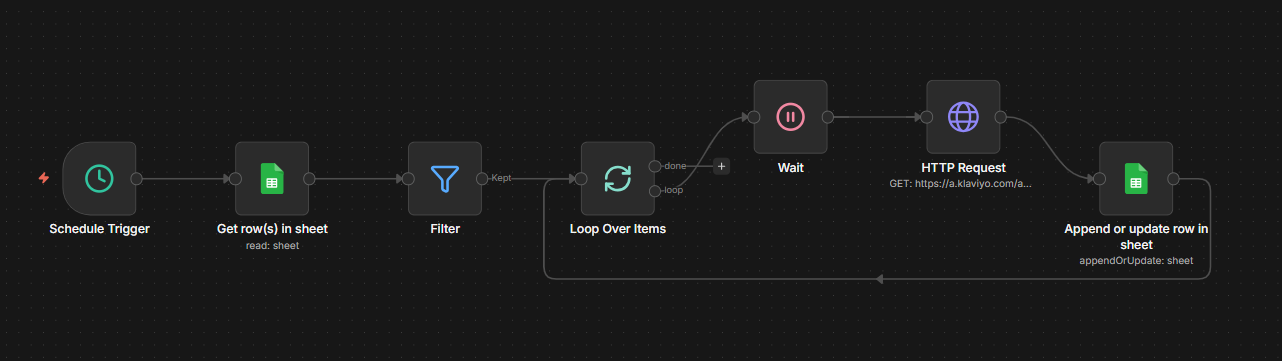
This n8n workflow automatically enriches a Google Sheet with Klaviyo Profile IDs, creating a central reference that bridges all systems.
How it works
The loop processes contacts one at a time with a deliberate pause between requests, respecting API rate limits while ensuring complete coverage.
Business impact
Before automation
- Manual profile lookups across platforms
- Incomplete customer context
- Generic marketing campaigns
- Hours spent on data reconciliation
After automation
- Single reference sheet with all IDs
- Unified view linking Shopify and Klaviyo data
- Precise segmentation based on complete profiles
- Fully automated, hands-off synchronization
Why this matters for e-commerce
Complete customer profiles
When Shopify purchase data meets Klaviyo engagement data, you understand not just what customers bought, but how they interact with your brand.
Sales team precision
Equip your sales team with complete customer context before every interaction. Combined with lead scoring based on engagement and purchase history, reps focus on the highest-potential opportunities.
Operational efficiency
Teams stop wasting time on manual data lookups. The enriched sheet becomes the single source of truth for customer operations.
Scalable foundation
As contact volume grows, the automation scales automatically. No additional manual effort required.
Getting started
The implementation requires API access to Klaviyo, a Google Sheet structured with email addresses and designated columns for profile IDs, and n8n for orchestration. Once configured, the workflow runs continuously in the background, keeping your customer data synchronized across all platforms.
The technical setup is straightforward. The operational clarity it provides is substantial.